
Starbucks
Starbucks Coffee CompanyFood & Drink
4.8263.01K Reviews
- Version
- 6.135
- Installs
- 10.00M
- Age Rating
- Everyone
Screenshots
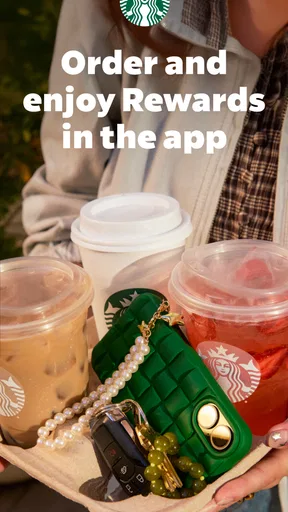
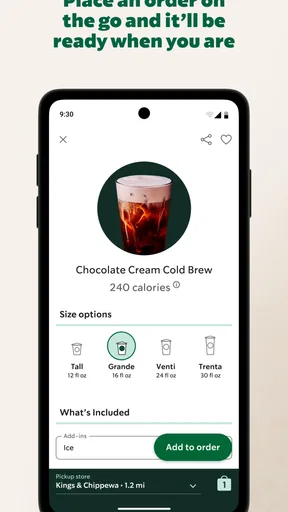
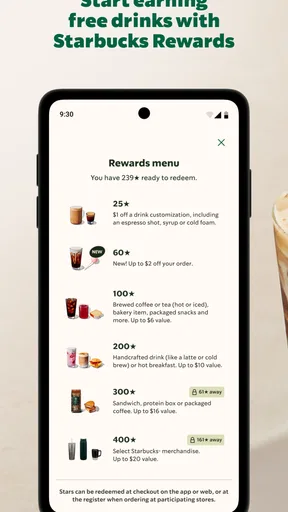

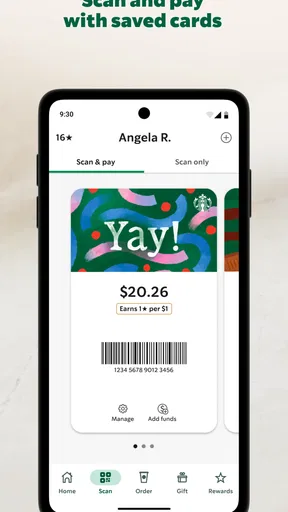

Our Review of Starbucks
 Analysis by Appyee
I judge a coffee-ordering app less by how many buttons it has than by whether it helps when I’m running late, unsure what a drink contains, or standing somewhere unfamiliar. The Starbucks app is most useful when I already know I want something from Starbucks and want to handle the order, payment, or card balance before reaching the counter. It can make a familiar routine smoother, but it does not make every coffee stop effortless: the result still depends on the selected store, the order details, and the visit itself.
Made by Starbucks Coffee Company, this free Food & Drink app is rated for Everyone and has a 4.8 average from around 1.5 million ratings, with more than 10 million installs. It has been available since June 14, 2011, and version 6.112 requires Android 10 or later. Those figures suggest a widely used service, but I would treat popularity as context rather than proof that it fits every routine. If I rarely visit Starbucks, the app may add an extra step instead of saving one.
Making a Starbucks run work smoothly
I find the smoothest Starbucks runs start with one small decision made before I open the app: which location actually fits my route. That keeps convenience from turning into a last-minute store switch, and it makes the order review more meaningful. Once that habit is in place, I can focus on the details that matter at pickup, especially when my usual drink needs a change.
Where the routine can snag
The app’s main promise is convenience, yet ordering ahead only helps if I slow down enough to check the important choices. A nearby location may not be the one I intend to visit, and a saved or familiar drink can still need a quick review before I place it. I make a point of checking the selected store and the order summary rather than tapping through on autopilot. That small pause is more useful than assuming every screen reflects the last visit.
Customization is another place where speed can work against me. A drink name may feel familiar while its size, milk choice, or extra shot is different from what I meant to select. I find it helpful to read the finished order from top to bottom before confirming, especially when changing a regular order. That habit also gives me a chance to notice whether I have chosen a food item or drink I did not intend to add.
Setup checks before the first order
I would start by making sure the app is current and that the phone meets its Android requirement; the listed minimum is Android 10. Then I would sign in and check that the Starbucks Card and payment details I intend to use are ready. A phone that is not connected reliably can interrupt any online ordering flow, so I prefer to set things up at home or while I have a stable connection rather than for the first time in a queue.
The app is free to install, but that does not mean purchases are free: drinks and food are still paid for, and loading money onto a Starbucks Card is a separate choice. I would only add a balance if I expect to use it. If I visit occasionally, paying in the way that suits that visit may be simpler than keeping money parked on a card. For a regular, a card balance can make repeat payments feel more direct, but it is worth checking the balance before relying on it for a rushed stop.
A useful order-and-pickup rhythm
For a weekday run, I would place an order only after deciding which Starbucks location fits my route. I would review the drink customizations, check the total and selected store, then keep the order details handy while heading there. This is not a reason to assume the drink is ready the moment I tap; I still allow time to reach the shop and follow whatever pickup instructions are shown. When I arrive, I check that I have the right order before leaving, particularly if I have made a less usual customization.
That workflow is especially handy when I know my regular order and want fewer decisions during a busy morning. It is less useful when I am still choosing between drinks or when I am already at the counter and can simply ask a barista a question. Ordering in advance should reduce friction, not pressure me to rush through choices I have not made.
Recovering when a step goes wrong
If an order does not appear to go through, I avoid immediately submitting it again. First I check the order status and payment details so I do not accidentally create a duplicate. If the screen is slow, I give it a moment and check the connection before trying again. When a card balance seems lower than expected, I look at the account and recent activity rather than adding more money straight away. These are simple checks, but they help separate a delay from a genuinely incomplete step.
If the app closes or becomes unresponsive, I reopen it and confirm where I left off before making another payment or order. Keeping the app updated is a sensible first step for recurring glitches; restarting the phone or switching to a dependable connection can also help with basic loading trouble. For a time-sensitive visit, I would not keep repeating the same action without checking the result. If the issue concerns a charge or an order that remains unclear, I would use Starbucks’ available customer-support route rather than guess.
When another option is better
The app is not the right tool for every coffee stop. If I want to compare cafés, find the best price, or choose from a broad range of independent shops, a general map or local search is more useful. If I need a detailed answer about ingredients or a change that is not clear in the ordering screen, asking staff directly is safer than assuming an option means what I hope it means. And if I visit Starbucks only once in a while, ordering in person may be easier than setting up an account and managing a card balance.
Compared with paying at the counter, the app’s advantage is keeping a familiar order and payment flow on the phone. The trade-off is that I need to check the screen carefully and depend on the phone and connection. Compared with a general food-ordering service, it is focused on Starbucks rather than helping me browse across restaurants. That focus is valuable when Starbucks is already my destination; it is a limitation when I have not decided where to go.
Who gets the most from it
I would recommend it most to people who visit Starbucks regularly, tend to order the same drink, and like to handle payment before reaching the counter. It can also be convenient for someone planning a stop on a commute, provided they choose the intended location and leave enough time to collect the order. The strongest benefit is not a dramatic new coffee experience; it is reducing small repeat tasks for a routine I already have.
Someone who prefers spontaneous café choices, wants to pay only in person, or does not want another account to maintain may be happier without it. The app also cannot resolve every uncertainty about a drink: when an ingredient, substitution, or dietary concern matters, I would confirm it with the café rather than rely only on a quick menu selection. That is a sensible boundary for any ordering tool, especially when a customized drink is involved.
My practical verdict
If you're anything like me, your day isn’t complete without a good cup of coffee. That's why I was pretty excited to try out the Starbucks app. Let me tell you, it's so much more than just ordering a latte on the go. This app is like having your own personal barista in your pocket.
First Impressions
When I first opened the Starbucks app, I was greeted with a sleek and user-friendly interface. It’s got that classic Starbucks vibe—clean, modern, and super easy to navigate. The home screen gives you quick access to everything you need: order, pay, and even customize your favorite drinks. It’s like having the coffee shop at your fingertips!
Ordering Made Easy
I absolutely love how intuitive the ordering process is. You can easily browse through the menu, which is updated regularly with seasonal favorites and new releases. Customizing your drink is a breeze—whether you’re adding an extra shot of espresso or opting for almond milk. And if you’re a creature of habit like me, the app remembers your past orders, so reordering your go-to drink is ridiculously simple.
Rewards and Perks
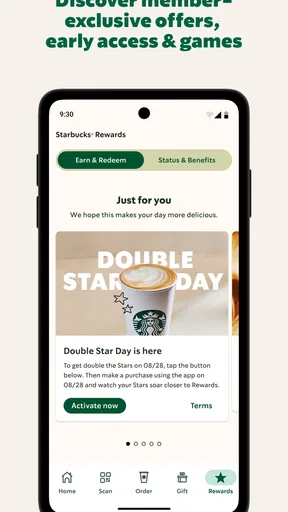
Who doesn’t love getting rewarded for their coffee obsession? The Rewards program in the app is a game-changer. Every purchase earns you Stars, which you can redeem for free drinks, food, and more. Plus, the app keeps you in the loop with special offers and double Star days. It’s a sweet deal for regulars!
Paying with Ease
Tired of juggling your phone and wallet? The app’s integrated payment system is an absolute lifesaver. You can easily add funds to your Starbucks Card and pay directly from your phone. It’s quick, secure, and perfect for those busy mornings when you’re rushing out the door.
Find Your Nearest Fix
Ever been in a new city and desperately needed a caffeine fix? The app’s store locator will point you to the nearest Starbucks in no time. It’s super handy for finding locations nearby, complete with store hours and amenities.
Overall, the Starbucks app is a must-have for any coffee lover. It’s packed with features that make getting your caffeine fix more convenient and rewarding than ever. So, if you haven’t tried it yet, what are you waiting for? Download it, grab your favorite drink, and enjoy the perks of being a loyal Starbucks fan!
That is the balance I would keep in mind: the app is strongest when it supports an established Starbucks habit, not when I expect it to choose a café or answer every question for me. I would set it up calmly, verify the store and order before confirming, and use the card only in a way that suits how often I visit. With those checks, it can make a familiar stop more organized; without them, ordering at the counter may be the simpler choice.
Privacy and Permissions
See what permissions an app requests and how it handles your data.
- Contacts
- read your contacts
- Location
- approximate location (network-based), precise location (GPS and network-based)
- Camera
- take pictures and videos
- Wi-Fi connection information
- view Wi-Fi connections
- Other
- view network connections, change network connectivity, full network access, run at startup, control vibration, prevent device from sleeping
Verdict
Strengths of Starbucks
- User-friendly interface with intuitive navigation.
- Customizable drink orders for personal preferences.
- Rewards program offers frequent discounts.
- Mobile ordering reduces wait times significantly.
- Store locator helps find nearby outlets easily.
Limitations of Starbucks
- App occasionally lags during peak times.
- Limited payment options outside of gift cards.
- Requires internet connection for full functionality.
- Notifications can be overly frequent and intrusive.
- Some features require account sign-up.
Similar Picks in This Category
View All
Rappi: Food Delivery, Grocery
Rappi, Inc - Delivery3.5

McDonald’s: Cupons e Delivery
Arcos Dorados4.3

Swiggy: Food Instamart Dineout
Swiggy4.7

Blinkit: Groceries & more
Blinkit4.8

foodpanda: food & groceries
Foodpanda GmbH a subsidiary of Delivery Hero SE4.0

Zomato: Food Delivery & Dining
Zomato4.7
Frequently Asked Questions
What features does the Starbucks app offer to enhance my coffee experience?
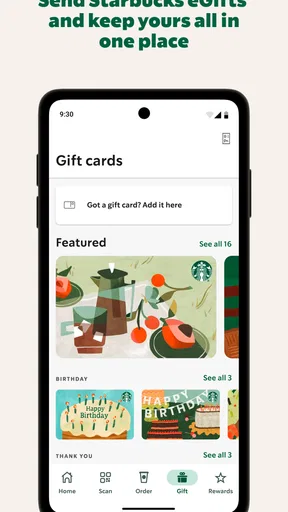
The Starbucks app provides a range of features designed to enhance your coffee experience. You can order and pay ahead to skip the line, customize your favorite drinks, and earn rewards with every purchase. The app also provides a store locator, personalized offers, and the ability to send gift cards to friends and family.
How does the Starbucks Rewards program work through the app?
The Starbucks Rewards program allows you to earn stars for every purchase made through the app. These stars can be redeemed for free drinks, food, and more. The more you use the app, the higher your membership level, unlocking additional benefits such as free refills and birthday rewards.
Is the Starbucks app available for both Android and iOS devices?
Yes, the Starbucks app is available for both Android and iOS devices. You can download it from the Google Play Store for Android devices and the Apple App Store for iOS devices. The app is regularly updated to ensure compatibility and enhance user experience across all platforms.
Can I use the Starbucks app to place mobile orders at any Starbucks location?
While the Starbucks app supports mobile ordering at many locations, availability can vary. Most company-owned stores accept mobile orders, but some licensed stores, such as those in airports or grocery stores, may not. It’s recommended to check the app for participating locations before placing your order.
Is my personal and payment information secure on the Starbucks app?
Starbucks takes security seriously, employing encryption and other security measures to protect your personal and payment information. The app allows you to manage your payment methods securely, and features like biometric login add an extra layer of protection. Always ensure your app is updated for the latest security enhancements.
